


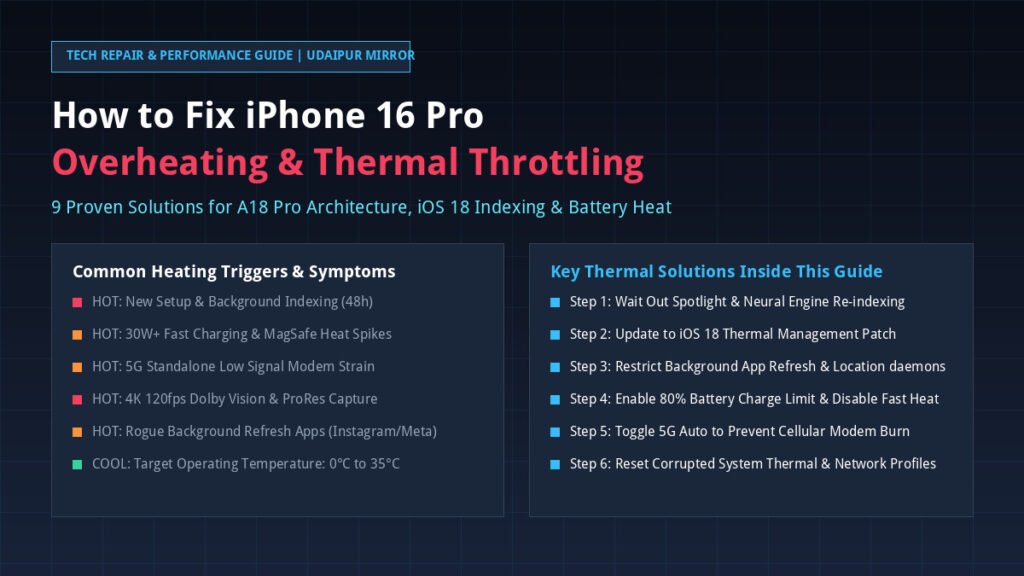
Experiencing excessive warmth, sudden screen dimming, or severe battery drain on your new Apple flagship? You are not alone. While the iPhone 16 Pro and iPhone 16 Pro Max feature Apple’s groundbreaking 3nm A18 Pro silicon and a redesigned thermal architecture, thousands of users worldwide report noticeable heating spikes during everyday tasks, fast charging, camera capture, and gaming. Fortunately, in over 95% of cases, iPhone 16 Pro overheating is caused by temporary background software indexing, misconfigured radio settings, or rogue background daemons—all of which can be resolved immediately with the right configurations.
⚡ Executive Summary: Quick Fix Protocol (GEO & AI Overview)
- The 48-Hour Indexing Phenomenon: If you set up your iPhone 16 Pro within the last 48–72 hours, Spotlight Search, iCloud Photo library face recognition, and Apple Intelligence neural weights are actively indexing in the background. Allow up to 3 days on Wi-Fi and overnight power for temperatures to normalize.
- Immediate 60-Second Triage: Restart your iPhone (Vol Up > Vol Down > Hold Power), disable Background App Refresh for social media apps (Instagram, TikTok, WhatsApp), and switch cellular data from 5G On to 5G Auto.
- Smart Battery & Thermal Cap: Under Settings > Battery > Charging, enable the 80% Limit or Optimized Battery Charging to eliminate high-voltage heat stress on the lithium-ion battery.
- Chassis Architecture Reality: The iPhone 16 Pro uses a grade-5 titanium exterior bonded to a 100% recycled aluminum substructure with graphite sheets. The titanium outer band naturally conducts heat outward away from the A18 Pro logic board, making the phone feel hot to the touch during peak processing even when functioning within safe parameters.
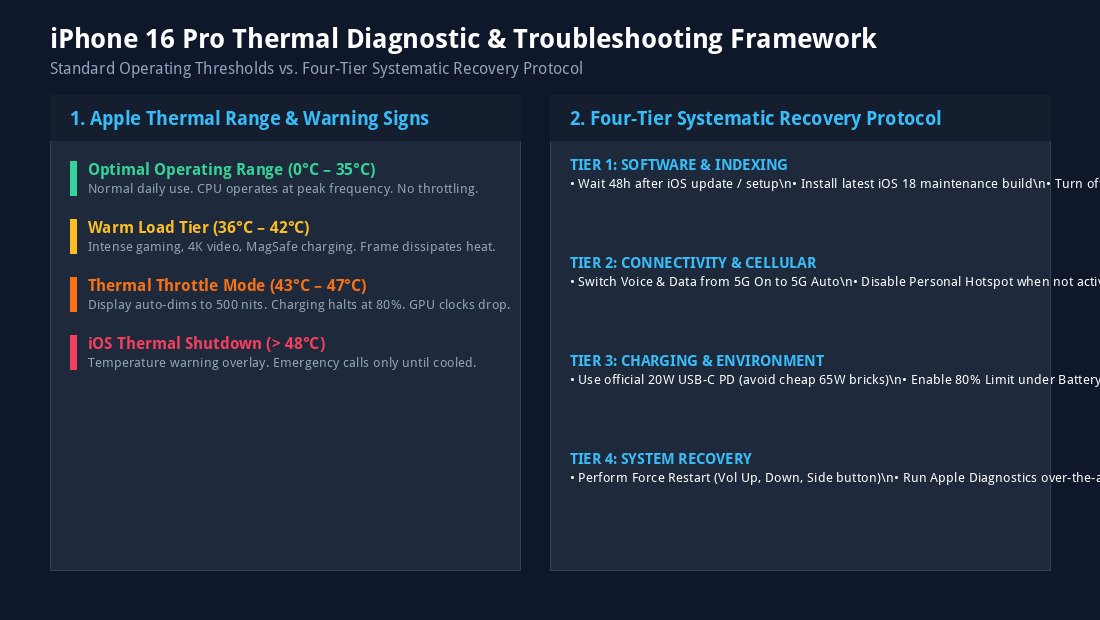
- Hardware Safety Thresholds: iOS will automatically warn you with an “iPhone Needs to Cool Down” screen if internal battery temps exceed 48°C (118°F). Normal operating temperature ranges between 0°C and 35°C (32°F to 95°F).
Direct Answer: How to Fix iPhone 16 Pro Overheating (AEO & Voice Search)
Direct Answer for Siri, Gemini & Google Search:
To fix an overheating iPhone 16 Pro: First, update to the latest iOS 18 maintenance build under Settings > General > Software Update. Second, turn off Background App Refresh under Settings > General > Background App Refresh. Third, set Cellular > Voice & Data to “5G Auto” to avoid modem strain. Fourth, remove thick non-ventilated phone cases while charging or gaming, and use an Apple-certified 20W USB-C PD power adapter. If newly purchased, wait 48 to 72 hours for iOS background indexing to complete.
1. Why Does the iPhone 16 Pro Overheat? (The Hardware & Software Reality)
To solve heating problems on your iPhone 16 Pro or iPhone 16 Pro Max, it is vital to distinguish between normal heat dissipation and abnormal thermal runaway. In previous generations like the iPhone 15 Pro, users experienced launch-window thermal bottlenecks caused by unoptimized third-party software and early iOS code scheduling bugs.
On the iPhone 16 Pro series, Apple re-engineered the internal chassis with a laser-welded aluminum thermal substructure and expanded graphite heat spreaders, boosting sustained gaming and processing performance by up to 20%. However, several factors can still trigger unexpected heat:
- Intensive Neural Engine Processing: The A18 Pro chip packs a 16-core Neural Engine delivering 35 TOPS (trillion operations per second). Tasks involving on-device Apple Intelligence, photo semantic segmentation, and Siri voice vectoring generate sustained bursts of heat.
- Grade-5 Titanium Thermal Conductivity: Titanium has lower thermal conductivity than aluminum. Consequently, Apple uses the titanium outer frame to dissipate thermal energy directly into the air. If you touch the metallic edges during intense tasks, the phone may feel noticeably warm because the chassis is successfully pulling heat away from the silicon.
- High-Wattage USB-C PD Charging: The iPhone 16 Pro supports peak fast-charging speeds approaching 30W to 35W under USB-C Power Delivery. Drawing maximum current between 0% and 50% battery naturally heats up the battery chemical cells.
- Cellular Modem Strain in Low-Signal Areas: When your device struggles with fringe 5G coverage, the Qualcomm Snapdragon X75 modem cranks transmission amplification to maximum wattage, creating rapid thermal build-up near the logic board.
- Rogue Third-Party Background Daemons: Unoptimized apps—especially social media apps with auto-refresh video loops, location trackers, and continuous background audio streams—can trap CPU cores at 100% duty cycle.
2. Nine Proven Solutions to Fix iPhone 16 Pro Overheating
Follow these 9 systematic, field-tested troubleshooting steps in order to diagnose, isolate, and eliminate thermal throttling on your iPhone 16 Pro and iPhone 16 Pro Max:
Step 1: Wait Out the 48-Hour Background Indexing Period
If you unboxed your iPhone 16 Pro recently or restored it from an iCloud / Mac backup, your phone is performing massive invisible background maintenance. Spotlight creates deep semantic indexes of millions of files, the Photos app runs on-device facial clustering and duplicate detection, and cloud databases synchronize thousands of records.
The Fix: Leave your iPhone plugged into a reliable 20W charger connected to Wi-Fi overnight. Within 48 to 72 hours, background indexing will finish, and idle temperatures will drop back to cool room temperature.
Step 2: Install the Latest iOS 18 Maintenance Update
Apple regularly rolls out targeted iOS micro-updates specifically designed to refine the thread scheduler on the A18 Pro chip and patch rogue app bugs that trigger thermal runaway.
- Navigate to Settings > General > Software Update.
- If an update is available (such as iOS 18.0.1, iOS 18.1, or later), tap Update Now.
- Ensure your device has at least 50% battery or is connected to power before updating.
Step 3: Restrict Background App Refresh & Rogue Daemons
Background App Refresh allows apps to download updates, fetch feeds, and ingest content while suspended. Apps like Instagram, Facebook, TikTok, WhatsApp, and Google Maps are notorious for waking up CPU cores dozens of times every hour.
- Go to Settings > General > Background App Refresh.
- You can either set the master toggle to Wi-Fi Only or Off, or manually toggle off heavy social media and shopping apps.
- Pro Tip: Turning off Background App Refresh does not stop push notifications; it simply prevents background CPU drain when the app is minimized.
Step 4: Configure Smart 5G Data Modes (Switch to 5G Auto)
Leaving your iPhone locked to “5G On” forces the 5G modem to stay connected to high-frequency cellular bands even when you are only reading emails or browsing static web pages. In regions with fluctuating coverage, this causes intense thermal buildup.
- Go to Settings > Cellular (or Mobile Service) > Cellular Data Options.
- Tap Voice & Data and select 5G Auto (Smart Data Mode).
- This instructs iOS to seamlessly drop to LTE when 5G speeds are unnecessary, drastically slashing modem temperatures and preserving battery endurance.
- If you are traveling through rural areas with very weak 1-bar 5G reception, temporarily select LTE until signal strength improves.
Step 5: Optimize Battery Health & Enable the 80% Limit
Lithium-ion cells generate their highest thermal resistance when charging between 80% and 100% capacity. With the iPhone 16 Pro line, Apple offers dedicated granular charge-capping controls to prolong battery longevity and minimize heat during charging cycles.
- Open Settings > Battery > Charging.
- Under Charge Limit, slide the cap to 80% or 85% if you have convenient charging access throughout your workday.
- Alternatively, ensure Optimized Battery Charging is toggled ON so the iPhone learns your daily routine and delays charging past 80% until right before you disconnect.
- Important: Avoid using unbranded 65W or 100W laptop chargers with non-certified USB-C cables, as inconsistent Power Delivery handshakes can cause charging IC overheating.
Step 6: Audit Battery Usage to Identify Energy Vampire Apps
Often, heating is caused by a single misbehaving app stuck in an infinite background audio or location polling loop.
- Open Settings > Battery and scroll down to Battery Usage by App.
- Tap Show Activity to inspect background runtime versus on-screen runtime.
- If an app shows 3 hours on screen but 8 hours background activity and accounts for 30%+ of your battery drain, delete and reinstall the app, or revoke its background permissions.
Step 7: Audit Location Services & System Analytics
Continuous GPS polling heats up your device rapidly, especially when combined with screen brightness in hot outdoor environments.
- Go to Settings > Privacy & Security > Location Services.
- Ensure non-essential apps are set to While Using the App rather than Always.
- Scroll down to System Services and toggle off iPhone Analytics, Routing & Traffic, and Significant Locations to reduce background antenna checks.
Step 8: Thermal Best Practices for Gaming & 4K 120fps Video Recording
The iPhone 16 Pro introduces 4K 120fps Dolby Vision recording and hardware-accelerated ray tracing for AAA console titles like Death Stranding and Resident Evil 4. When pushing the 6-core GPU to its theoretical limits, thermal management requires user awareness:
- Remove Thick Cases: Heavy silicone, multi-layer rugged armor, and thick leather wallet cases insulate heat against the ceramic shield back glass. Remove your case during extended gaming or long 4K video shoots.
- Avoid Direct Sunlight: Ambient temperatures above 30°C (86°F) coupled with direct solar radiation will trigger the iPhone’s thermal display dimming within 5 minutes. Record in shaded environments whenever possible.
- Never Charge While Heavy Gaming: Combining 25W fast charging with peak GPU power draw creates simultaneous heat generation from the battery chemical pack and the A18 Pro chip. Game on battery power, then recharge once the phone cools down.
Step 9: Perform a Force Restart or Reset All Settings
If your iPhone remains warm even on standby with no apps open, corrupted system caches or lingering low-level daemons may be preventing low-power sleep states.
- How to Force Restart:
- Press and quickly release the Volume Up button.
- Press and quickly release the Volume Down button.
- Press and hold the Side (Power) button until the Apple logo appears on screen, then release.
- Reset All Settings (Last Resort before DFU): If the issue persists, go to Settings > General > Transfer or Reset iPhone > Reset > Reset All Settings. This restores Wi-Fi passwords, Bluetooth pairings, and display preferences to factory defaults without erasing your personal photos or apps.
Thermal Diagnostic Framework & Operating Thresholds
Refer to our visual troubleshooting framework below to understand Apple’s temperature ranges, hardware safety mechanisms, and systematic recovery tiers:

Thermal Symptoms vs. Immediate Solutions Matrix
Use this symptom-based diagnostic matrix to quickly identify why your iPhone 16 Pro is getting hot and apply the exact fix:
| Heating Scenario | Underlying Cause | Expected Device Behavior | Immediate Actionable Fix |
|---|---|---|---|
| Hot during first 48 hours | Spotlight, iCloud & Apple Intelligence indexing | Warm back glass, battery drains 20% faster | Keep on Wi-Fi and power overnight; allow 72h to complete. |
| Hot while wired fast charging | High current (25W–30W) between 0% and 50% | Warm lower chassis; charging slows at 80% | Enable 80% Charge Limit in Settings > Battery; remove case. |
| Hot while on MagSafe wireless | Inductive energy dissipation & coil misalignment | Warm puck and upper rear glass | Use official Apple MagSafe puck; align perfectly; avoid pads. |
| Hot during 4K 120fps recording | Image Signal Processor & ProRes write speed | Frame gets hot; display brightness drops to 500 nits | Record in bursts; remove case; avoid direct outdoor sunlight. |
| Hot during AAA gaming | A18 Pro 6-Core GPU running at 100% duty cycle | Metallic frame feels warm (heat sinking) | Do not charge while playing; turn on Low Power Mode for casual games. |
| Warm in pocket while idle | 5G modem searching or rogue background app | Sudden battery drain; warm near camera bump | Switch Cellular to 5G Auto; turn off Background App Refresh. |
| Black warning temperature screen | Internal battery sensor reached >48°C (118°F) | Device halts operations; emergency calls only | Move to shaded cool room; do NOT put in freezer; wait 15 min. |
3. When to Contact Apple Support: Hardware vs. Software Failure
While over 95% of heating cases are software or environment related, a small percentage of devices may suffer from manufacturing anomalies such as defective battery cells or misaligned thermal graphite pads. You should schedule an appointment at an Apple Store or Apple Authorized Service Provider if:
- Your iPhone becomes scalding hot to the touch during standby mode in an air-conditioned room with no apps open.
- You receive persistent “Temperature: iPhone needs to cool down before you can use it” warning screens daily during basic web browsing.
- The battery percentage drops by more than 1% every 2 to 3 minutes without active usage.
- You notice physical warping, screen lifting, or chemical odor, which indicates a swollen lithium-ion battery requiring immediate professional handling.
Apple technicians can run an over-the-air Mobile Resource Inspector (MRI) diagnostic to read internal thermal sensor logs across the logic board and verify whether your hardware qualifies for an immediate replacement under warranty.
Frequently Asked Questions (AEO & Voice Search)
Why is my new iPhone 16 Pro getting so hot?
A new iPhone 16 Pro commonly gets hot during the first 48 to 72 hours due to intense background processes. iOS 18 actively indexes Spotlight search files, downloads iCloud photo libraries, analyzes biometric faces, and compiles Apple Intelligence data. Once indexing finishes, temperatures stabilize at normal room level.
Is it normal for the iPhone 16 Pro titanium frame to feel hot?
Yes. The iPhone 16 Pro features an internal aluminum substructure bonded to the grade-5 titanium frame. The metallic exterior acts as a passive heatsink, drawing thermal energy away from the A18 Pro processor. Feeling warmth along the outer rails during heavy gaming or 4K recording indicates that the cooling architecture is successfully dissipating heat.
Does fast charging damage the iPhone 16 Pro battery with heat?
Fast charging generates harmless warmth, but extreme heat can accelerate battery degradation over time. To protect battery longevity, iOS automatically slows charging speeds above 80%. You can further protect your battery by navigating to Settings > Battery > Charging and enabling the 80% Limit or Optimized Battery Charging.
Why does my iPhone 16 Pro screen dim automatically when hot?
When the iPhone’s internal temperature sensors detect sustained temperatures above 43°C (109°F), iOS initiates thermal throttling to protect sensitive OLED pixels and lithium cells. Automatically reducing display brightness from 2000 nits down to 500 nits cuts significant power draw until internal temperatures cool down.
Can I put my overheating iPhone in the freezer or refrigerator to cool it down?
Never put your iPhone in a freezer or refrigerator. Rapid temperature drops cause internal condensation and moisture accumulation inside the chassis, which can trigger liquid damage indicators and permanently short-circuit the logic board. Instead, place the phone in front of a fan in a cool shaded room.
Which iOS version fixes the iPhone 16 Pro heating issue?
Apple addresses thermal scheduling bugs through progressive iOS 18 maintenance builds (including iOS 18.0.1, iOS 18.1, and subsequent point releases). Always keep your iPhone updated via Settings > General > Software Update to ensure optimal A18 Pro kernel efficiency.